Source Control
Locus works without source control. When Unreal has an active provider, Locus applies provider-aware rules according to each content type’s ownership.
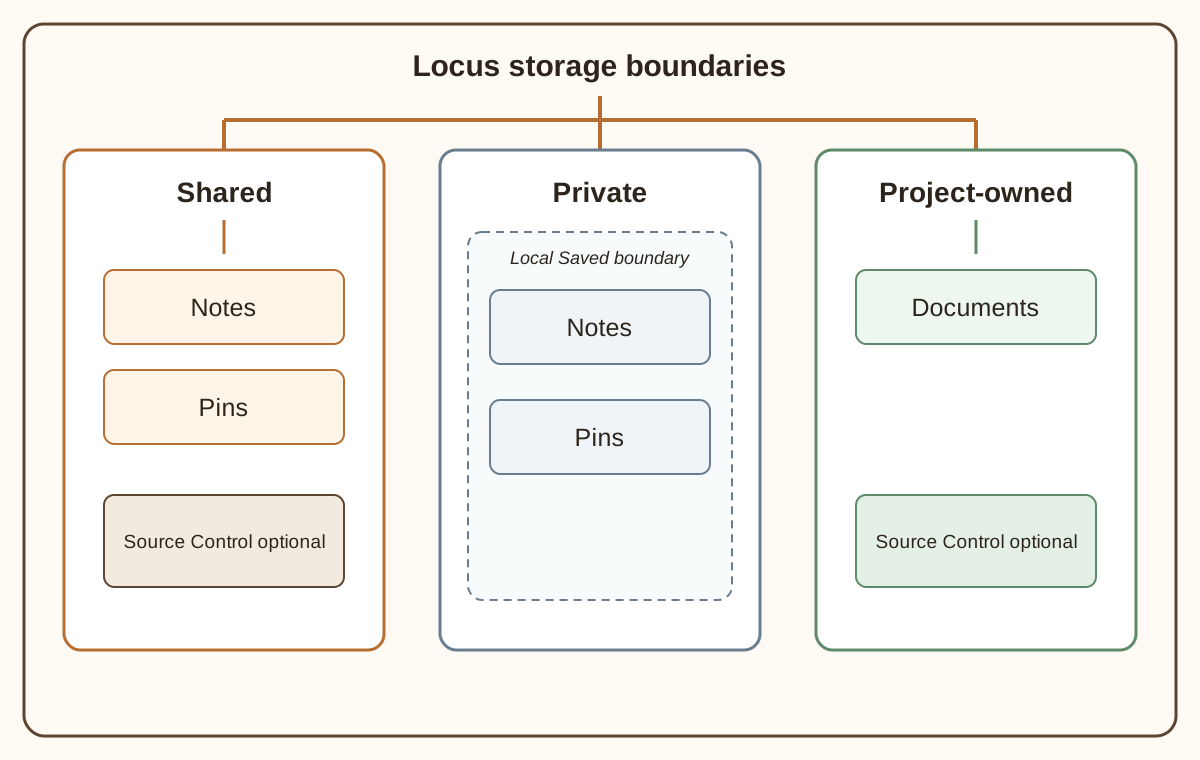
Ownership determines provider behavior
Section titled “Ownership determines provider behavior”| Content | Provider behavior |
|---|---|
| Shared Notes | Post-create Mark for Add request; explicit checkout, status, and safe delete when controlled |
| Private Notes | No provider query or operation |
| Shared Pins | Created local and Untracked; explicit Mark for Add; automatic checkout before a controlled mutation; status and safe delete |
| Private Pins | No provider query or operation |
| Documents | Project-owned; created Untracked, then explicitly Mark for Add; checkout, status, and safe delete when controlled |
Private means local to the project’s Saved storage boundary. Locus maintains strict zero-provider behavior for Private Notes and Pins.
Local Mode
Section titled “Local Mode”If no provider is configured, Locus enters Local Mode. Local and untracked files remain editable without provider warnings or background provider calls. Notes, Pins, and Documents omit source-control-specific UI: there is no provider status, status indicator, tooltip or guidance, troubleshooting text, Mark for Add, or Check Out affordance. Local Mode does not make the files private: Shared Notes, Shared Pins, and Documents still live in project-owned roots and can later be added to a repository.
A configured-but-unavailable provider is a distinct state. An existing file already known to be depot-controlled remains protected instead of silently becoming writable, and Locus may show the required safety status or recovery guidance.
When a provider is configured and available, the bottom status bar uses Unreal’s standard revision-control icon; hover it for provider details. Show Source Control Status controls compact row indicators for Shared Notes, Shared Pins, and Documents. It is only a presentation preference and does not change provider behavior, safety feedback, or action eligibility. Clean tracked rows remain visually quiet where the workspace documents that behavior.
Checkout and read-only states
Section titled “Checkout and read-only states”Selecting, opening, or reading a clean controlled Shared Note or Shared Pin does not check it out. A Shared Note remains read-only until you use Check Out. A supported mutation of a controlled Shared Pin requests checkout automatically and proceeds only after the provider allows it. A failed checkout leaves the content protected.
Controlled Documents remain readable, but their authoritative Markdown Edit and Save actions stay unavailable until checkout succeeds. The same protection applies when a controlled file is checked out by another user or client, is out of date, is disconnected from its required provider, or is in a state Locus cannot verify. Export Copy remains available for Documents where applicable.
After reconnecting the provider, refresh Source Control or Locus if needed. The controlled state returns, but a clean file remains read-only until explicitly checked out.
Locus does not provide a Make Writable bypass for a read-only controlled file.
New files and Mark for Add
Section titled “New files and Mark for Add”New Shared Notes are written locally and retain their post-create Mark for Add request. If that provider operation fails, the valid local file remains and the action can be retried. New Shared Pins remain local and Untracked until you explicitly choose Mark for Add; eligible multi-selected Pins may be added together. A Shared Pin Snapshot is a separate image artifact with its own Mark for Add or Check Out state.
New Documents intentionally remain Untracked. Create, organize, rename, move, and edit the Document first, then use Mark for Add when its final path is stable. An Untracked Document can be renamed or moved when otherwise safe. A Document that is Marked for Add or already controlled cannot be renamed or moved through Locus, because Locus cannot guarantee a provider-neutral transactional move. It does not use a Make Writable fallback or ask you to disable source control to work around that boundary.
A local file is not shared with teammates until it is added and submitted through the project’s normal workflow. Once submitted, the file is controlled and uses Check Out for later edits; it is not marked for add again.
Delete
Section titled “Delete”Deletion requires confirmation. For controlled files, Locus checks the reported state and routes the delete through the provider before local cleanup. It blocks deletion when another user owns the checkout, the file is out of date, or safety cannot be established.
Perforce guidance
Section titled “Perforce guidance”Perforce is the provider with current project validation evidence. A common project typemap choice for collaborative Notes and Pins is:
text+l //....uenotetext+l //....locuspinThis treats the JSON-backed files as text with exclusive locking. Markdown Documents are normal text files; choose the .md policy that fits the repository. Locus never edits the Perforce typemap for you.
Perforce is the live-certified provider. Other Unreal Source Control providers are best effort and unvalidated; validate provider behavior in a disposable project before relying on it.
Recovery and external conflicts
Section titled “Recovery and external conflicts”Recovery snapshots protect unsaved local work and do not replace source control. An external conflict occurs when disk content changes while a local editor has pending changes; Locus blocks a silent overwrite and offers safe resolution actions. Source-control out-of-date status and editor conflicts are related but separate conditions.
See the recovery sections in Notes, Pins, and Documents, or use Troubleshooting.